Fast keyboard capture
Record tasks, events, notes, and ideas quickly while your hands are already on the keyboard.
 Jott.itGet Jott.it
Plan your days, review your weeks, and capture thoughts from the desktop where you already do your thinking.
Jott.it gives Mac users one private place for daily notes, tasks, events, habits, and longer-term plans. It is designed for quick keyboard entry and spacious calendar views, so capturing an idea does not interrupt the work already happening on your Mac.
Your journal stays in local files that you control. Open formats help keep those notes readable and portable beyond any one account or service.
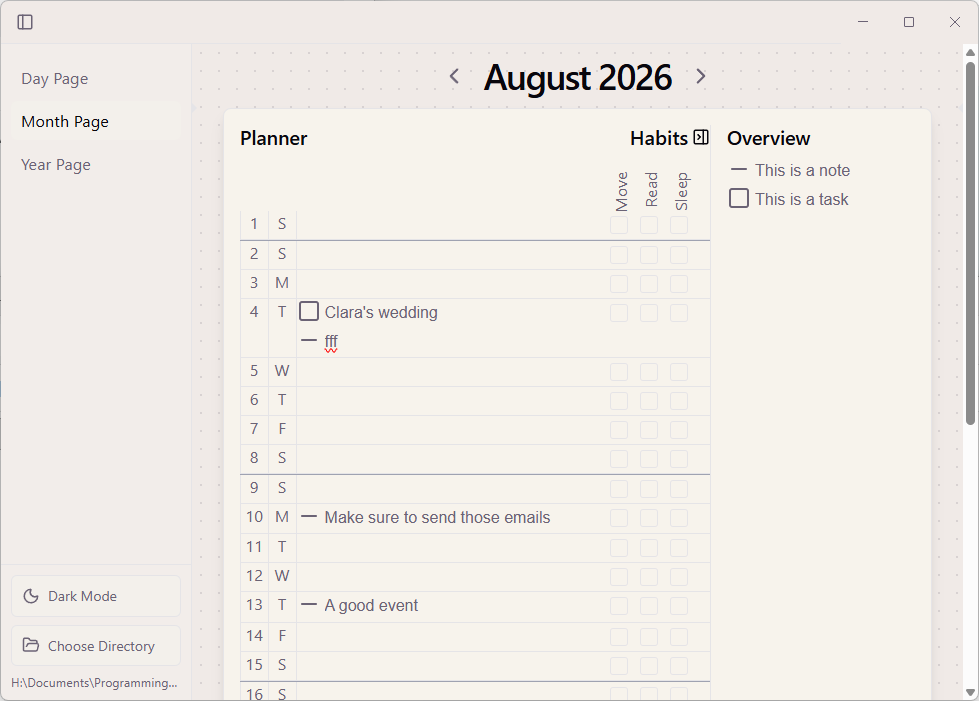
Record tasks, events, notes, and ideas quickly while your hands are already on the keyboard.
Open a fresh page for each day and keep its plans and reflections together in one place.
Step back from today, gather upcoming work, and set priorities for the week ahead.
Give long-range plans room to breathe on a desktop screen without losing the daily details.
See future commitments, reschedule unfinished work, and keep simple routines visible.
Keep personal writing on your Mac rather than storing your journal in Jott.it’s cloud.
A Mac journal is useful when planning, writing, and project work already happen at your desk. A full-sized screen makes daily pages, calendars, and longer notes easier to review together.
Jott.it is available directly from the Mac App Store, giving you a familiar installation and update experience on macOS.
Once installed, you can begin with today’s note and gradually add weekly reviews, monthly plans, habits, or any other parts of the bullet journal method that suit you.
View Jott.it in the Mac App Store ↗Yes. You can download Jott.it for Mac directly from the Mac App Store.
No. Jott.it is local-first and does not store or read the journal files you create on your Mac.
Yes. Each time scale is available alongside the calendar-based planning workflow, so daily actions and longer-term plans remain connected.
No. Start with the parts that help you—such as daily notes or rapid capture—and shape the practice around your own work.
Start a private digital bullet journal on your Mac. Free for the first 100 downloads.
Get Jott.it on the Mac App Store ↗